People search tile installer near me, shower tile installation, backsplash installation. Many are in the middle of a remodel and need the tile done on a schedule. The installers with a page for each kind of job and close-up photos of real work get those calls. This guide covers how local search works for tile installers and what a small company can do about it.
- Google says local results come from relevance, distance and prominence. Profile, pages and reviews are what you control.
- Showers, floors, backsplashes and repairs are separate searches. Give each a page.
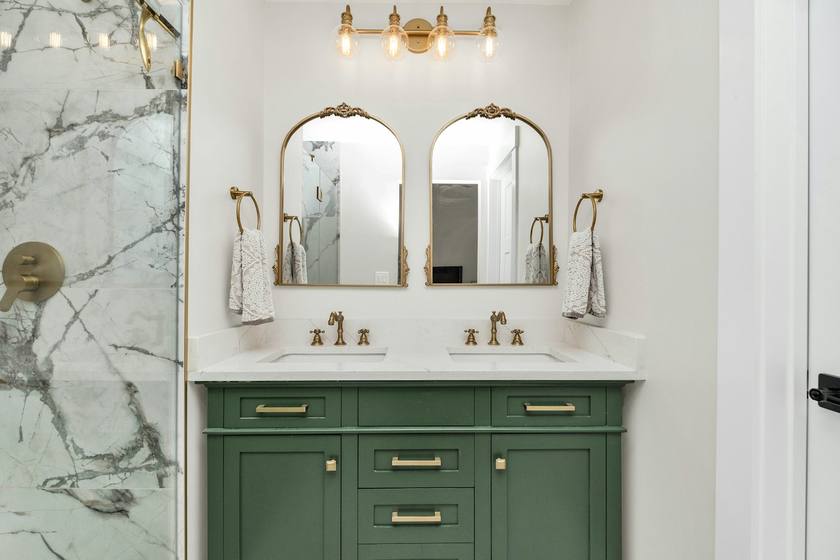
- Close-up photos of lines and corners prove the work better than any claim.
- Regrouting and shower repair pages catch smaller jobs between remodels.
- Ask every customer for a review, and never offer a discount for one.
How Google decides which tile installers to show
According to Google, local results mostly come down to relevance, distance and prominence, also described as popularity: a good match for the search, a short distance from the searcher and a business people know.
Most tile buyers start with one of two searches: "Tile installer near me", which Google answers with the map, or "Shower tile installation cost", which it answers with web pages. Each is won a different way.
Three kinds of tile searches
| Search | The customer | What wins |
|---|---|---|
| Tile installer near me | In a remodel and needs tile done | Listing photos and reviews of real work |
| Shower tile installation cost | Planning a bathroom | A page with ranges and what changes the price |
| Regrout shower | Cracked or stained grout | A repair page and a fast reply |
Near me searches go to the map. Buyers zoom into photos. Close-ups of straight lines and clean niches win the call.
Cost searches come from people planning a bathroom. A page that explains what moves the price, from tile size to waterproofing, earns the visit. The free square footage calculator helps them measure first.
Repair searches come from people tired of looking at old grout. A page and a fast reply book a small job that can turn into a full remodel.
When tile searches pick up
Searches follow the work. For tile installers, the busy stretch is late winter into spring and early fall, and it goes quiet in midsummer. Have the matching page and listing photos ready a few weeks before each busy month:
- January (get ready): new year bathroom plans
- February (busy): bathroom remodels
- March (busy): showers and floors
- April (busy): spring remodels
- September (get ready): fall remodels
- October (busy): bathrooms before guests
- November (busy): backsplashes before the holidays
Step 1: the Business Profile
Before anything else, get three parts of the tile listing right:
- Real name only. Stuffing services or towns into the name breaks Google's guidelines and can lead to a suspension. "Bayside Tile" is fine. "Bayside Tile Bathroom floors and showers Kitchen backsplashes Near Me" is not.
- Few categories. Google asks for as few categories as possible, chosen to describe the core of the business.
- Service area, address hidden. Google says a service-area business should hide its address from customers. Google lets a service-area business set up to 20 service areas, by city, postal code or other area.
Close-ups of grout lines, niches and corners, full showers and floors, before and after backsplashes, and your setup on site. Keep the name, phone and hours exactly the same as on your website. Koira keeps those details matching on Google and Bing for you.
Step 2: the pages a tile site needs
Think of each page as the answer to one search. For tile installers, that means at least these:
- Showers. Walls, pans, niches and how you waterproof.
- Floors. Bathrooms, kitchens and entries.
- Backsplashes. A small job worth a price on the page.
- Repair and regrouting. Cracked tile and tired grout.
- A price page. Ranges and what moves them; our guide to pricing tile jobs walks through it.
- One page per town you work.
Title each page with the service and the town, like "Tile floors in Valrico, FL | Bayside Tile", and write for the customer, not for a keyword count. Repeating keywords over and over is against Google's spam policies, says its starter guide. Koira writes a page for every town you work and every service you offer, from your business and price list.
Step 3: every finished job is proof
A tired shower next to the same shower retiled is a strong monthly post. Name the town and the tile. It shows Google where you work and shows the next homeowner exactly what they are paying for.
No time to write? Koira turns your job photos into a monthly post on your site.
Step 4: reviews from every job
Google says prominence is based partly on how many websites link to your business and how many reviews you have. Buyers of tile read reviews closely, so every new one helps twice: once with Google and once with the person deciding.
Google strictly prohibits offering incentives such as free or discounted goods or services for reviews. Google's Maps content policy does not allow businesses to discourage negative reviews or to ask only happy customers for reviews.
- Ask everyone, not only the happy ones, right after payment.
- Reply to every review and name the job: the shower, the floor, the backsplash. Buyers read reviews to see whether you were tidy and on time.
- Stuck on a reply? The free review reply generator writes one from templates.
Koira sends the ask an hour after the invoice is paid and drafts the reply.
Check where you stand
See how your listing, reviews and site compare with other tile installers nearby in about a minute, free.
Step 5: links you already have a reason to get
Google's local ranking page counts links from other websites toward prominence. Useful links for a tile installer: the tile showrooms and suppliers you buy from, remodelers and plumbers you work with, and manufacturer or training listings if you hold one.
What to skip
- Paid ranking schemes. Google is plain about it: you cannot request or pay for a better local ranking.
- Fake offices. A virtual office, meaning a rented address you do not work from, is not eligible for a Business Profile under Google's guidelines.
- The keywords meta tag. Google's starter guide says plainly that the keywords meta tag is not used by Google Search.
How to tell if it is working
- Calls, website clicks and direction requests from your Business Profile, by month.
- Requests for bathroom floors and showers and kitchen backsplashes that came from your site.
- Reviews per month compared with jobs finished.
- Where each booked tile job came from.
Compare season to season, not week to week. Google's starter guide says some changes show in a few hours and others take several months. Koira's reporting shows dollars paid on jobs Koira touched first, next to what Koira cost.
Paid leads alongside SEO
SEO takes months; some weeks you need calls now. Tile is not named on Google's Local Services list as we read it, so most paid options here are lead sites. See tile leads: where to buy them and how to need fewer, and tile marketing ideas for the rest of the plan.
Where Koira fits
You can do all of this yourself. Koira exists for the tile installers who would rather not: it builds the site and its pages, keeps listings in sync, asks for every review and posts your finished jobs. Office is free for the site, estimates and invoices, and Grow adds the receptionist and text-back for $249 a month plus usage at cost. See pricing or how a tile company runs on Koira.
Questions contractors ask
How do tile installers rank higher on Google?
Verify your Business Profile, add a page for each kind of job and each town, post close-up photos and ask every customer for a review.
Should tile installers post prices?
A price for small jobs like backsplashes, and ranges for showers, help people decide. Big jobs need a visit, so say what it covers.
Do close-up photos help tile SEO?
They help buyers decide, and a monthly post with photos gives Google fresh pages about the towns you work.
Can I pay Google to rank my tile business higher?
No. Google says there is no way to request or pay for a better local ranking. Local Services Ads are a separate, paid placement charged per lead.
Sources
- Google Business Profile Help: Tips to improve your local ranking on Google, checked October 9, 2026
- Google Business Profile Help: Guidelines for representing your business on Google, checked October 9, 2026
- Google Business Profile Help: Manage your service areas, checked October 9, 2026
- Google Business Profile Help: Tips to get more reviews, checked October 9, 2026
- Google Maps user contributed content policy: prohibited and restricted content, checked October 9, 2026
- Google Search Central: SEO Starter Guide, checked October 9, 2026
- Koira: pricing, checked October 9, 2026